Designing a Web Crawler
A system design interview guide to the component that quietly powers search engines, archives, and monitoring systems: a program that starts from a handful of links and walks the web one page at a time, discovering new pages as it goes — without drowning in duplicates, looping forever, or hammering any single server.
A web crawler (also called a spider or bot) is a program that systematically downloads web pages, extracts the links inside them, and follows those links to discover still more pages. It is the engine behind search indexing, but it shows up wherever you need to traverse the web at scale. The hard part is almost never downloading a single page — it is doing so for billions of pages while staying polite to the servers you visit, avoiding the same content twice, never getting stuck in an infinite loop, and surviving machine failures along the way. This guide walks through the standard component design and the design decisions behind each piece.
Contents
1. Purpose and Use Cases
Every crawler does the same mechanical thing — fetch a page, find its links, fetch those — but the reason for crawling shapes how aggressive, how fresh, and how selective it needs to be. Three families of use cases cover most designs.
| Use case | What the crawler is for | Design pressure |
|---|---|---|
| Search indexing | Download pages so a downstream indexer can build an inverted index for query serving. The classic motivation. | Breadth and coverage matter most; you want to reach as much of the web as possible and keep important pages reasonably fresh. |
| Archiving | Capture and preserve snapshots of pages over time so they can be retrieved later, even after the original is gone. | Completeness and fidelity matter; you store the raw content, often with periodic re-crawls to build a history. |
| Monitoring | Watch a known set of pages for changes — price changes, copyright or policy violations, broken links, defacement. | Freshness and targeting matter; the URL set is narrow and revisited on a tight schedule. |
These goals are not mutually exclusive, but they pull the design in different directions. A search crawler optimizes for reaching new pages; a monitoring crawler optimizes for revisiting a fixed set quickly. The component skeleton below is the same in all cases — what changes is how the frontier prioritizes work and how often pages are re-crawled.
2. Traversal Strategy: BFS vs DFS
The web is a directed graph: pages are nodes and hyperlinks are edges. Crawling is graph traversal, so the first design choice is how to traverse — breadth-first (BFS) or depth-first (DFS). The answer for almost every crawler is BFS, and the reasons are worth understanding because they explain the shape of the rest of the system.
| Strategy | How it explores | Why it does or doesn't fit crawling |
|---|---|---|
| BFS (breadth-first) | Visits all links on the current page before going deeper, using a FIFO queue: newly discovered URLs go to the back, the next URL to crawl comes off the front. | The usual choice. It explores the web layer by layer, naturally keeping the crawl near high-value entry points and spreading work across many hosts. |
| DFS (depth-first) | Follows one link as far as it goes before backtracking, using a stack. | Rarely a good fit. It dives down a single path and can descend extremely deep — link chains on the web can be very long — so it wanders far from your seeds and is easy to trap in a deep, low-value corner of one site. |
BFS wins for two practical reasons beyond graph shape. Politeness: a naive BFS that just queues links in discovery order tends to pull many URLs from the same host in a row, because pages link heavily within their own site — so the real frontier is a BFS refined with per-host scheduling (covered in section 5), not a single global queue. Freshness: because BFS stays close to your seed pages, which are typically high-importance hubs, it tends to discover and refresh important pages sooner than a depth-first dive into one site's archives. The takeaway: the crawler's core data structure is a queue, and the entire frontier design exists to turn a plain FIFO queue into one that is also polite and prioritized.
3. Component Architecture
A crawler is best understood as a pipeline. URLs flow in at one end, pages and freshly discovered URLs flow out, and the discovered URLs loop back to the start. Each stage is a separate component so it can be scaled and reasoned about independently.
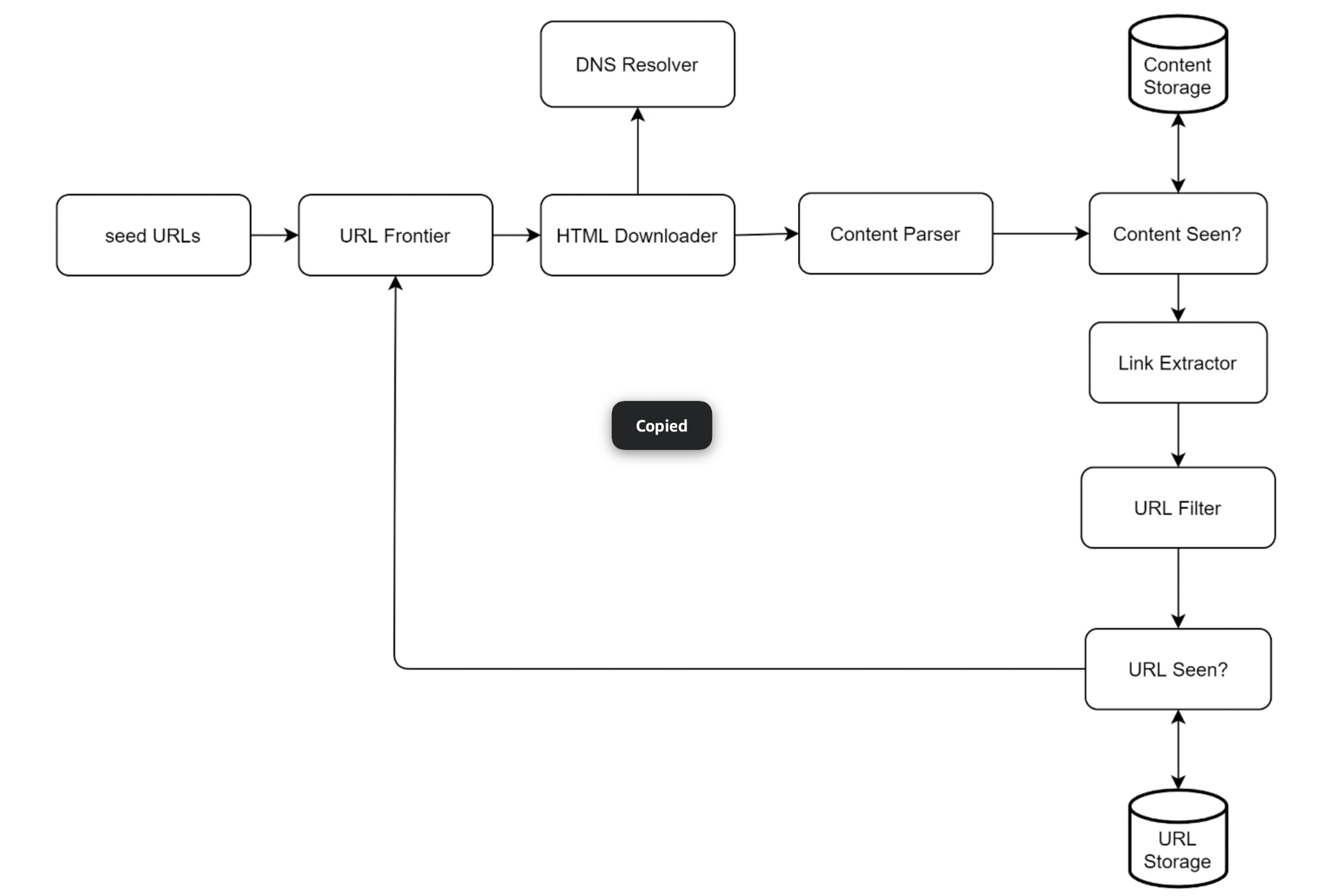
Reading the diagram as a loop:
- Seed URLs prime the URL Frontier with a starting set of pages to download.
- The HTML Downloader pulls a URL off the frontier and fetches the page, asking the DNS Resolver to turn the hostname into an IP address first.
- The Content Parser validates and parses the downloaded HTML.
- A "Content Seen?" check asks whether this exact page content has been stored before; new content goes to Content Storage, duplicates are dropped.
- The Link Extractor pulls hyperlinks out of the parsed page.
- Each extracted URL passes through a URL Filter (rejecting unwanted types and blocked sites), then a "URL Seen?" check; URLs that are new are recorded in URL Storage and fed back into the URL Frontier.
The loop continues until the frontier is empty or a stopping condition (page budget, depth limit, time limit) is reached. The two "Seen?" gates are what keep the loop from doing redundant work, and the filter is what keeps it from wandering into places it shouldn't go.
4. Walking the Components
Each box in the pipeline has one job. Taken together they turn "follow links" into a controlled, deduplicated, polite traversal.
Seed URLs
The crawl has to start somewhere. Seed URLs are the initial set fed into the frontier. Good seeds maximize coverage for the smallest set — popular, well-connected hub pages, or a partition by topic, by language, or by region. The choice matters: a crawler can only ever reach pages that are reachable by links from its seeds, so poor seeds leave whole regions of the web invisible.
URL Frontier
The URL Frontier is the queue of URLs waiting to be downloaded — the heart of the crawler. Conceptually it is the BFS FIFO queue, but in practice it does much more: it enforces politeness (don't overload any host) and prioritization (fetch important pages first). Section 5 covers it in depth; for now, think of it as a smart queue that decides what to download next and when.
HTML Downloader
The HTML Downloader takes a URL from the frontier and performs the HTTP fetch. This is the I/O-heavy workhorse of the crawler, so it is heavily parallelized — many concurrent fetches in flight at once, since each spends most of its time waiting on the network. It also honors per-host rate limits handed down by the frontier, sets timeouts, and follows (a bounded number of) redirects.
DNS Resolver
Before the downloader can connect, the hostname in the URL must be translated to an IP address. A DNS lookup is a network round trip that can take tens to hundreds of milliseconds — slow enough that, at crawl scale, it becomes a serious bottleneck if done naively. The fix is a caching DNS Resolver: the crawler keeps its own cache of hostname-to-IP mappings (respecting TTLs) so that the many URLs sharing a host resolve instantly after the first lookup.
Content Parser
Downloaded HTML can be malformed, truncated, or not HTML at all. The Content Parser parses and validates the page before anything downstream touches it. Pulling parsing into its own component keeps a slow or buggy parse from blocking the downloader, and gives a clean place to reject garbage early.
"Content Seen?"
Roughly a tenth of the web is duplicate or near-duplicate content — the same article republished, mirror sites, pages reachable by several URLs. Storing all of it wastes space and indexing effort. The "Content Seen?" check detects this by computing a hash or checksum of the page content and comparing it against the set of hashes already stored. If the hash has been seen, the page is a content duplicate and is dropped before it reaches storage. Comparing fixed-size hashes is far cheaper than comparing full documents.
Content Storage
Pages that survive the dedup check are written to Content Storage. Because the corpus is enormous, this is usually a hybrid of disk (for the bulk of the data) and memory or a fast cache (for popular and hot content), so that frequently accessed pages stay quick to read while the long tail lives cheaply on disk.
Link Extractor
The Link Extractor walks the parsed page and pulls out every hyperlink. It also resolves relative links (such as /about) into absolute URLs (https://example.com/about) so the rest of the pipeline always deals with complete, unambiguous URLs.
URL Filter
Not every discovered link should be crawled. The URL Filter drops URLs that are out of scope: file types you don't want (large binaries, images, videos if you only want HTML), blocked or blacklisted domains, error-prone or malicious links, and — importantly — anything disallowed by a site's robots.txt. Honoring robots.txt is a baseline politeness and legal courtesy: it is the site owner's published statement of which paths a crawler may and may not visit.
"URL Seen?"
The same URL is discovered over and over as different pages link to it. The "URL Seen?" check prevents the crawler from re-adding a URL it has already processed or already queued — without this gate, the BFS loop would revisit pages endlessly. It is typically implemented with a Bloom filter (very compact, allows a small false-positive rate) or a hash set of URLs. A Bloom filter is attractive at web scale because it answers "have I seen this?" using a fraction of the memory a full set would need; its only cost is that it may occasionally report a brand-new URL as already seen, which means skipping it.
URL Storage
URL Storage holds the set of URLs already discovered or visited — it is the durable backing for the "URL Seen?" check and the record of the crawl's progress. URLs that pass both the filter and the seen check are recorded here and fed back into the URL Frontier, closing the loop.
5. The URL Frontier in Depth
If there is one component to get right, it is the frontier. A plain FIFO queue gives correct BFS order but ignores the two constraints that matter most in production: politeness (don't overwhelm any single server) and priority (crawl important pages first). The standard design layers two sets of queues to handle both. This is also the component that answers the question "what should we download?" — it decides which URL goes out next.
Politeness via back queues
Politeness means the crawler should not send requests to one host faster than that host can comfortably handle, and ideally should wait a short delay between consecutive requests to the same server. The frontier enforces this with a set of back queues, where each back queue holds URLs for a single host. A mapping ensures all URLs of a given host route to the same back queue, and each back queue is drained by exactly one worker thread that adds a configurable delay between requests. The invariant is simple: one host is served by one worker, one request at a time, with a gap between requests. This guarantees the crawler is never hitting the same server in parallel, no matter how many links to that host it discovers.
Prioritization via front queues
Not all pages are equally worth crawling. A page's importance — estimated from signals such as PageRank, traffic, or update frequency — should decide how soon it is fetched. The frontier handles this with a set of front queues, one per priority level. A prioritizer assigns each incoming URL a priority and places it in the corresponding front queue; higher-priority queues are dequeued more often. URLs then flow from the front (priority) queues into the back (politeness) queues, so a URL is first sorted by importance and then scheduled politely by host.
| Layer | Job | Keyed by |
|---|---|---|
| Front queues | Decide order of importance — fetch high-priority pages sooner. | Priority level (e.g. PageRank bucket). |
| Back queues | Decide politeness — one host per queue, drained by one worker with a delay. | Host. |
function select_next_url():            # frontier hands work to a downloader
  fq = pick_front_queue_by_priority()  # higher priority chosen more often
  url = fq.dequeue()
  bq = back_queue_for_host(url.host)   # all of a host's URLs -> same queue
  bq.enqueue(url)
  return url

function worker_loop(back_queue):       # exactly one worker per host queue
  while True:
    url = back_queue.dequeue()
    fetch(url)                          # HTML Downloader
sleep(per_host_delay) # politeness gap6. Data and Correctness Issues
Left unchecked, a crawler will happily waste enormous resources on content it has already seen or get stuck forever in a corner of the web. Three classes of problem account for most of the trouble.
| Problem | What goes wrong | Defense |
|---|---|---|
| Redundant content | The same page is reachable through many URLs (tracking parameters, session IDs, mirror domains), so it gets downloaded and stored repeatedly. | URL normalization before the "URL Seen?" check, plus the content-hash "Content Seen?" check to catch byte-identical pages that slipped through with different URLs. |
| Spider traps | A site exposes an effectively infinite URL space — a calendar with a "next month" link forever, or deeply nested dynamic paths — and the crawler descends without end, never running out of new URLs. | Cap crawl depth, limit the number of URLs per host, watch for suspiciously long or repetitive URL patterns, and honor robots.txt exclusions. Hard-to-detect traps may need manual blocklisting. |
| Problematic / duplicate content | Near-duplicate pages (the same article with minor boilerplate differences), spam, or low-value auto-generated content pollute the corpus and waste indexing effort. | Near-duplicate detection (e.g. similarity hashing rather than exact checksums), spam classification, and content-quality filters downstream of the parser. |
Notice that the two "Seen?" gates in the pipeline are doing double duty here: "URL Seen?" defends against redundant fetches of the same address, and "Content Seen?" defends against redundant storage of the same content even when the addresses differ. Spider traps are the case the gates alone cannot stop — because every trap URL really is new — which is why depth and per-host limits exist as a separate backstop.
7. Scalability and Robustness
A toy crawler runs on one machine with an in-memory queue. A real one must span many machines, run for weeks, and shrug off failures. Two themes dominate: distributing the work and not losing it when something breaks.
- Distributed frontier. The frontier and downloaders are sharded across many machines, typically by hashing the host so that each crawler node owns a disjoint set of hosts. This both spreads load and keeps the politeness invariant simple — since one host lives on one node, that node alone enforces the per-host delay without cross-node coordination.
- Distributed "Seen?" state. The URL-seen set and content-seen set are themselves huge and must be partitioned (by URL hash, by content hash) across nodes or a shared store. Bloom filters keep each shard's footprint small.
- Checkpointing. Because a full crawl can run for a long time, the frontier's state and the seen-sets are periodically snapshotted to durable storage. If a node crashes, it restarts from the last checkpoint rather than re-crawling from the seeds.
- Handling failures. Individual fetches fail constantly — timeouts, 5xx errors, DNS failures. The crawler retries transient errors with exponential backoff, gives up after a bounded number of attempts, and isolates failures so one bad host or one dead node does not stall the rest of the crawl. Worker nodes are treated as replaceable: if one dies, its host shards are reassigned to surviving nodes.
The unifying idea is that every piece of crawl state — the frontier, the seen-sets, the stored content — is partitioned and made durable, so the system scales by adding nodes and recovers by restoring from a checkpoint rather than starting over.
8. Summary
A web crawler is a deceptively simple loop made robust by a handful of well-placed components:
| Concern | Mechanism |
|---|---|
| How does it traverse the web? | Breadth-first from seed URLs using a FIFO-based frontier; DFS is avoided because it descends too deep and wanders from the seeds. |
| What gets downloaded next, and when? | The URL Frontier: front queues order by importance (PageRank), back queues enforce politeness (one host, one worker, a delay). |
| How are pages fetched efficiently? | A heavily parallelized HTML Downloader backed by a caching DNS Resolver to avoid repeated slow lookups. |
| How is duplicate work avoided? | "URL Seen?" (Bloom filter / hash set) skips already-queued addresses; "Content Seen?" (content hash) skips already-stored pages. |
| How is scope controlled? | The URL Filter rejects unwanted file types, blocked domains, and paths disallowed by robots.txt. |
| How does it avoid getting stuck? | Depth limits, per-host URL caps, and pattern detection guard against spider traps and infinite URL spaces. |
| How does it scale and survive? | Frontier and seen-sets sharded by host/hash across nodes, checkpointed to durable storage, with retries and node reassignment on failure. |