NGINX — Internal Architecture
A developer's guide to how NGINX actually works under the hood: the process model, the event-driven core, how a request flows through the processing phases, and how it proxies, load-balances, caches, and reloads without dropping a single connection.
NGINX is a high-performance web server, reverse proxy, load balancer, and HTTP cache. It was written to solve one specific problem: serving tens of thousands of simultaneous connections on a single machine without the memory and context-switch overhead of the thread-per-connection model that dominated when it was created. Almost every design decision flows from that goal. Instead of one operating-system thread per client, NGINX uses a small fixed number of worker processes, each running a single-threaded event loop that multiplexes thousands of non-blocking connections. Understanding NGINX means understanding that event-driven core and the way work is organized around it.
Contents
1. Design Goals and the C10k Problem
NGINX was created to answer the C10k problem: how does a single server handle ten thousand concurrent connections? The traditional answer — one thread (or process) per connection — does not scale. Each thread carries a stack of one to several megabytes, so ten thousand threads burn gigabytes of memory before doing any work. Worse, the kernel must constantly context-switch between them, and most of those threads are idle, blocked waiting on a slow client or a slow network. The cost grows with the number of connections, not the amount of useful work.
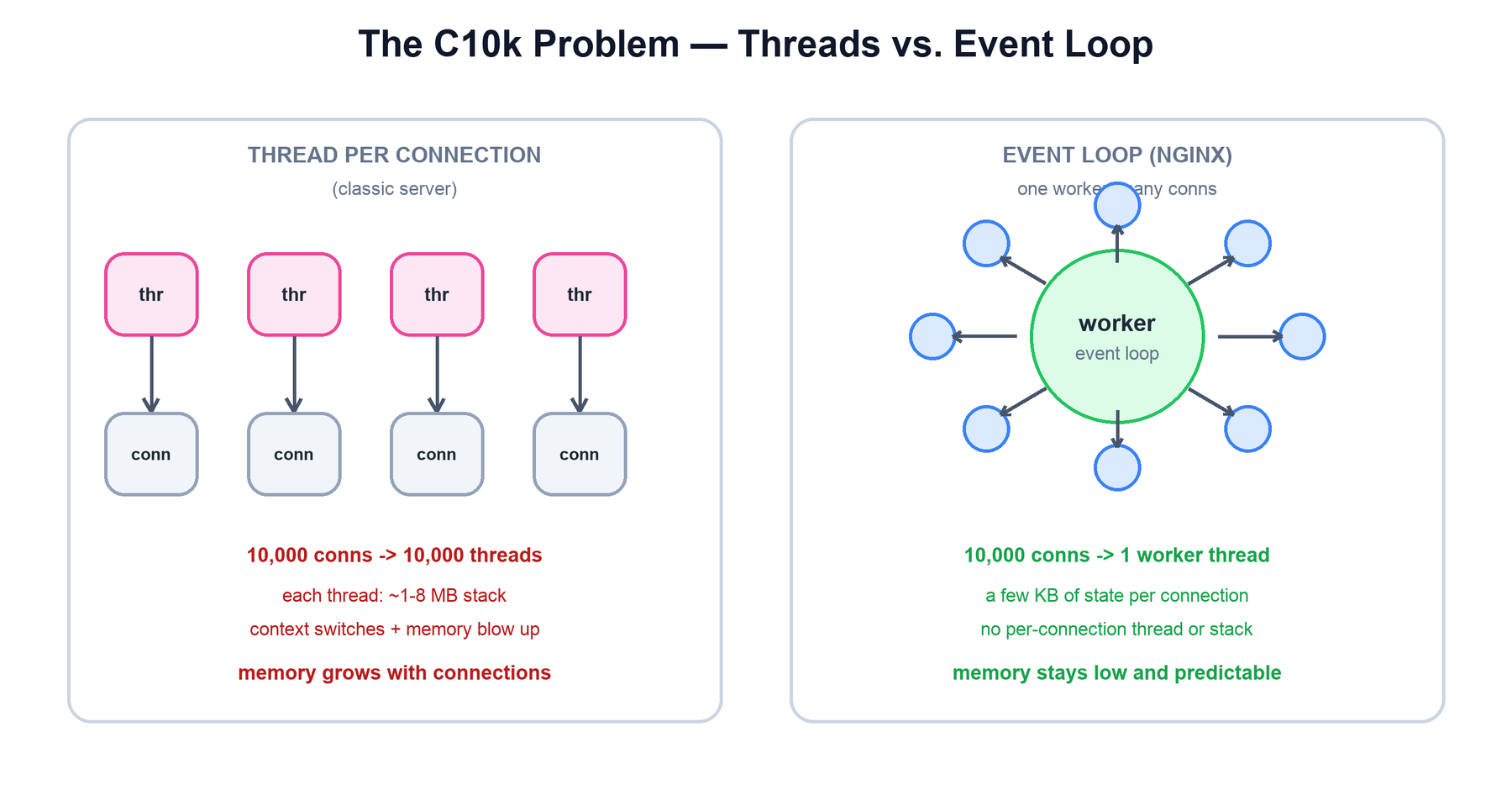
NGINX inverts this. A single worker thread asks the kernel "which of my thousands of sockets is ready to read or write?" and then services exactly those, never blocking on the rest. The result is the property the whole project is built around: throughput scales with hardware while memory use stays flat and predictable as connections climb.
| Goal | How NGINX achieves it |
|---|---|
| High concurrency | One worker multiplexes thousands of connections via a non-blocking event loop, not one thread per connection. |
| Low, predictable memory | Per-connection state is a small struct (a few KB), not a thread stack. Memory tracks active work, not connection count. |
| Full use of multiple cores | A handful of worker processes — typically one per CPU core — each run their own event loop in parallel. |
| Operational stability | Config reloads and even binary upgrades happen with zero dropped connections. |
| Efficient as a proxy | Buffering, upstream keepalive, and on-disk caching shield slow clients from fast backends and vice versa. |
2. Process Architecture
An NGINX instance is not one process but a small family. A single master process runs as root, reads and validates the configuration, and binds the listening sockets (port 80, 443, and so on). It does not serve any client traffic itself. Instead it forks a configured number of worker processes, drops their privileges to an unprivileged user, and hands each of them the already-bound listening sockets. The workers are where all request handling happens.
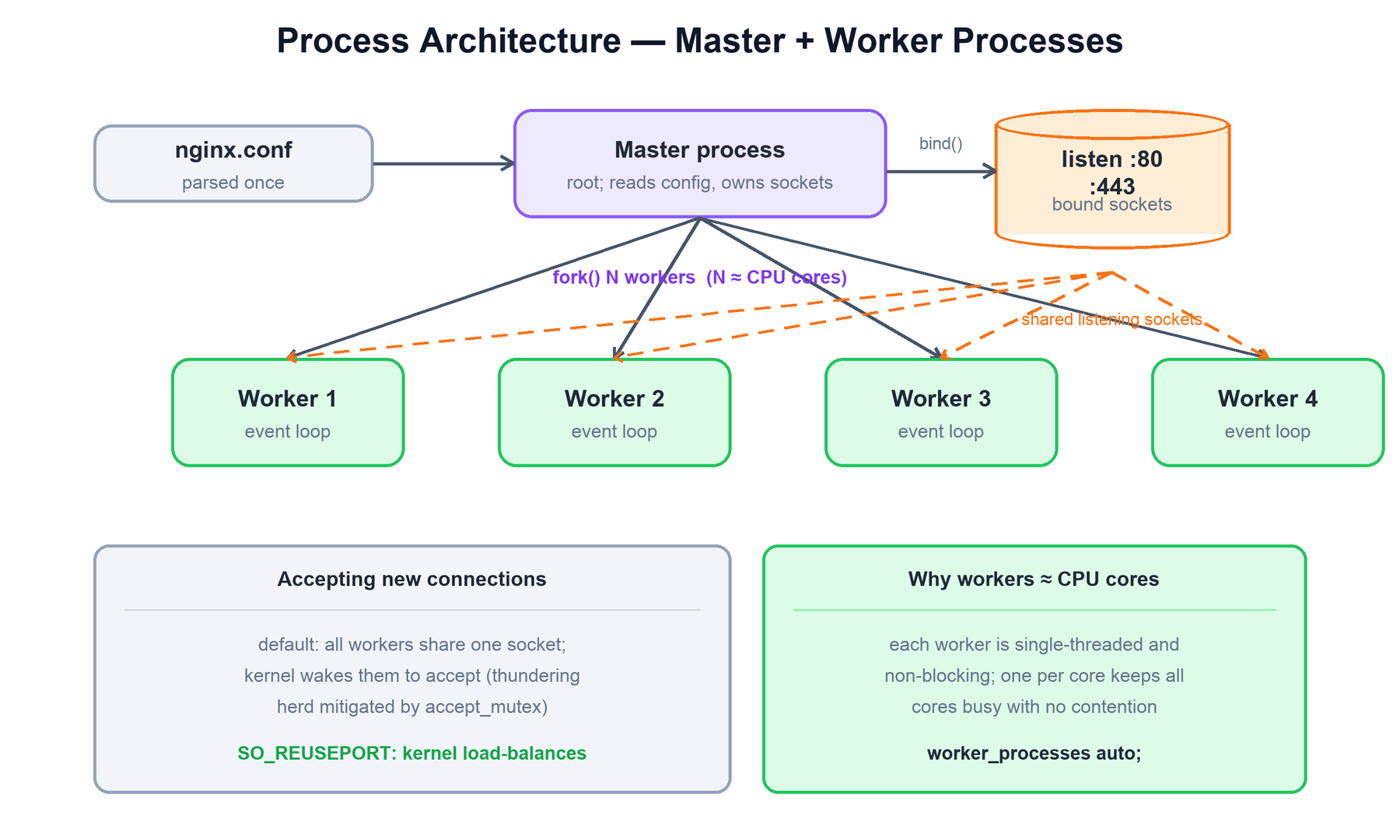
The division of labor is deliberate:
- Master process: the supervisor. It reads
nginx.conf, binds sockets, spawns and monitors workers, and responds to control signals. Because it keeps the listening sockets, it can spawn replacement workers (on a reload) or even a whole new binary (on an upgrade) without ever closing the listening sockets and dropping incoming connections. - Worker processes: the workhorses. Each is single-threaded and runs its own event loop. They are independent — there is no shared request state to lock between them, which is exactly what avoids contention. State that genuinely must be shared (caches, rate-limit counters, upstream health) lives in shared memory, described later.
- Helper processes: optionally a cache manager (evicts and trims the on-disk cache) and a cache loader (loads cache metadata into shared memory at startup).
Why workers ≈ CPU cores
Because each worker is single-threaded and never blocks, a single worker can keep one CPU core fully busy. Running one worker per core (worker_processes auto;) means all cores do useful work with no two workers fighting over the same core. Adding more workers than cores just adds scheduling overhead without adding throughput.
Sharing the listening sockets
All workers inherit the same listening sockets from the master, so any worker can accept any new connection. By default the kernel may wake several waiting workers when a connection arrives — the "thundering herd" — and NGINX historically used an accept_mutex so only one worker accepts at a time. The modern alternative is SO_REUSEPORT: each worker opens its own listening socket on the same port and the kernel load-balances incoming connections across them, eliminating the herd and spreading accepts evenly.
master:
  parse(nginx.conf)
  for addr in listen_directives:
    sock = bind(addr); listen(sock)     # sockets owned by master
  for i in range(worker_processes):     # typically = CPU cores
    pid = fork()
    if pid == 0:
      drop_privileges()
      run_event_loop(inherited_sockets) # worker never returns
  supervise(children)                    # restart on crash, handle signals
3. The Event-Driven Model
Inside each worker is the heart of NGINX: a single-threaded event loop built on the operating system's scalable I/O readiness API — epoll on Linux, kqueue on BSD/macOS, and others elsewhere. Every socket is set to non-blocking mode. Rather than calling read() and waiting, the worker registers all its sockets with epoll and makes a single call — epoll_wait() — that blocks until any of those thousands of file descriptors is ready. The kernel returns just the ready ones, and the worker handles each, then loops.
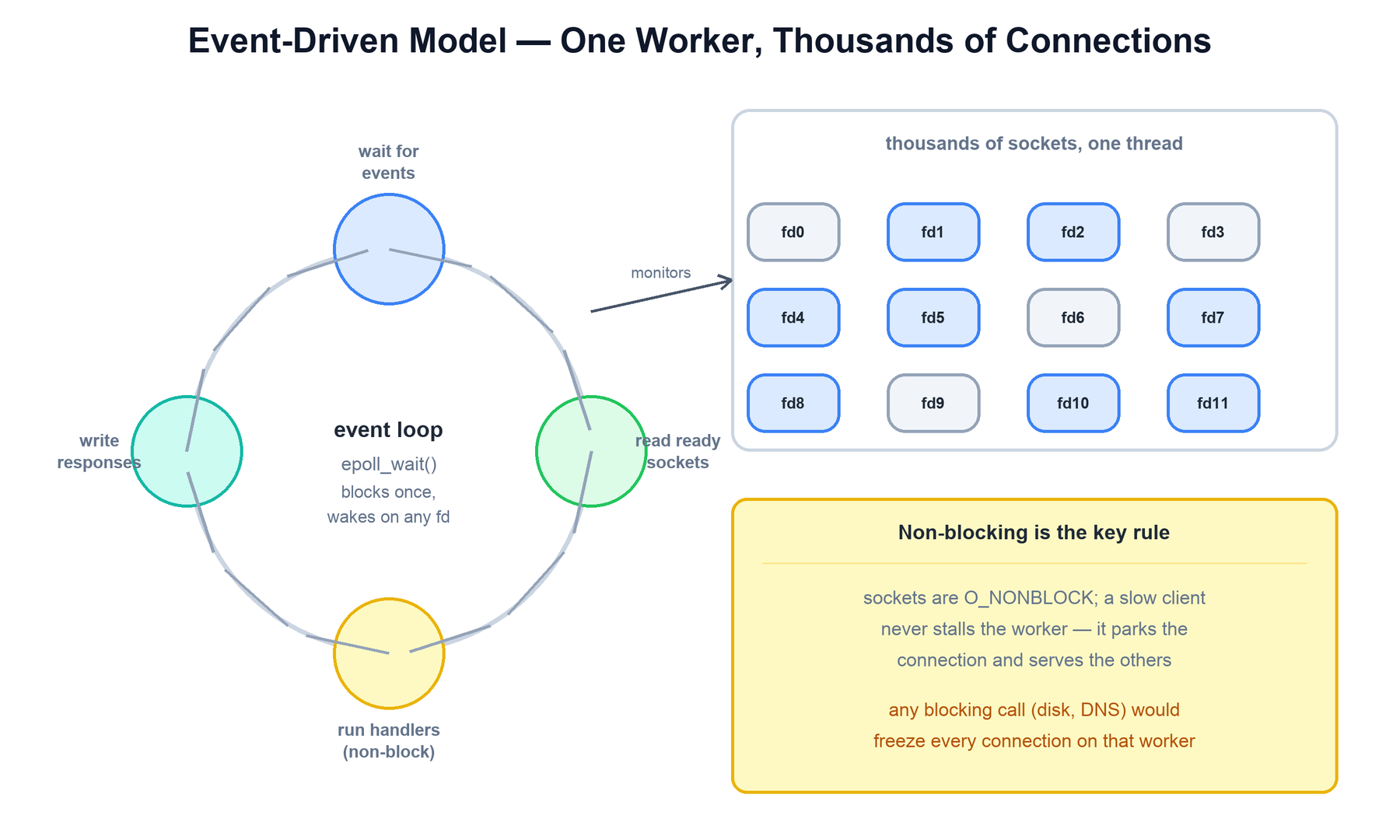
This is the opposite of the thread-per-connection model. There, each connection has a dedicated thread that calls a blocking read(); the kernel parks that thread until data arrives. With ten thousand connections you need ten thousand parked threads. With the event loop, one thread asks "who is ready?" and services only those — so the number of threads is tied to the number of cores, not the number of connections.
The cost of this model is a strict discipline: nothing in a handler may block. A blocking disk read, a synchronous DNS lookup, or a slow database call would freeze the entire worker and every connection it is serving, not just the one that issued it. NGINX therefore uses non-blocking I/O everywhere it can, and for the unavoidable blocking operations (notably reading large files from disk) it offloads them to a small thread pool so the event loop stays responsive.
run_event_loop(sockets):
  epoll = epoll_create()
  for s in sockets: epoll.add(s, READABLE)
  while True:
    events = epoll.wait(timeout = next_timer())   # blocks once, on all fds
    for ev in events:
      conn = ev.connection
      handler = conn.current_handler              # read / write / proxy ...
      handler(conn)        # MUST be non-blocking; returns quickly
run_expired_timers() # keepalive, proxy timeouts, etc.4. Request Lifecycle
When a connection is accepted, the worker reads and parses the request line and headers, then runs the request through an ordered series of processing phases. NGINX's modular architecture hangs handler modules off these phases; the phase order is what makes configuration directives composable and predictable. A request always flows through the phases in the same sequence.
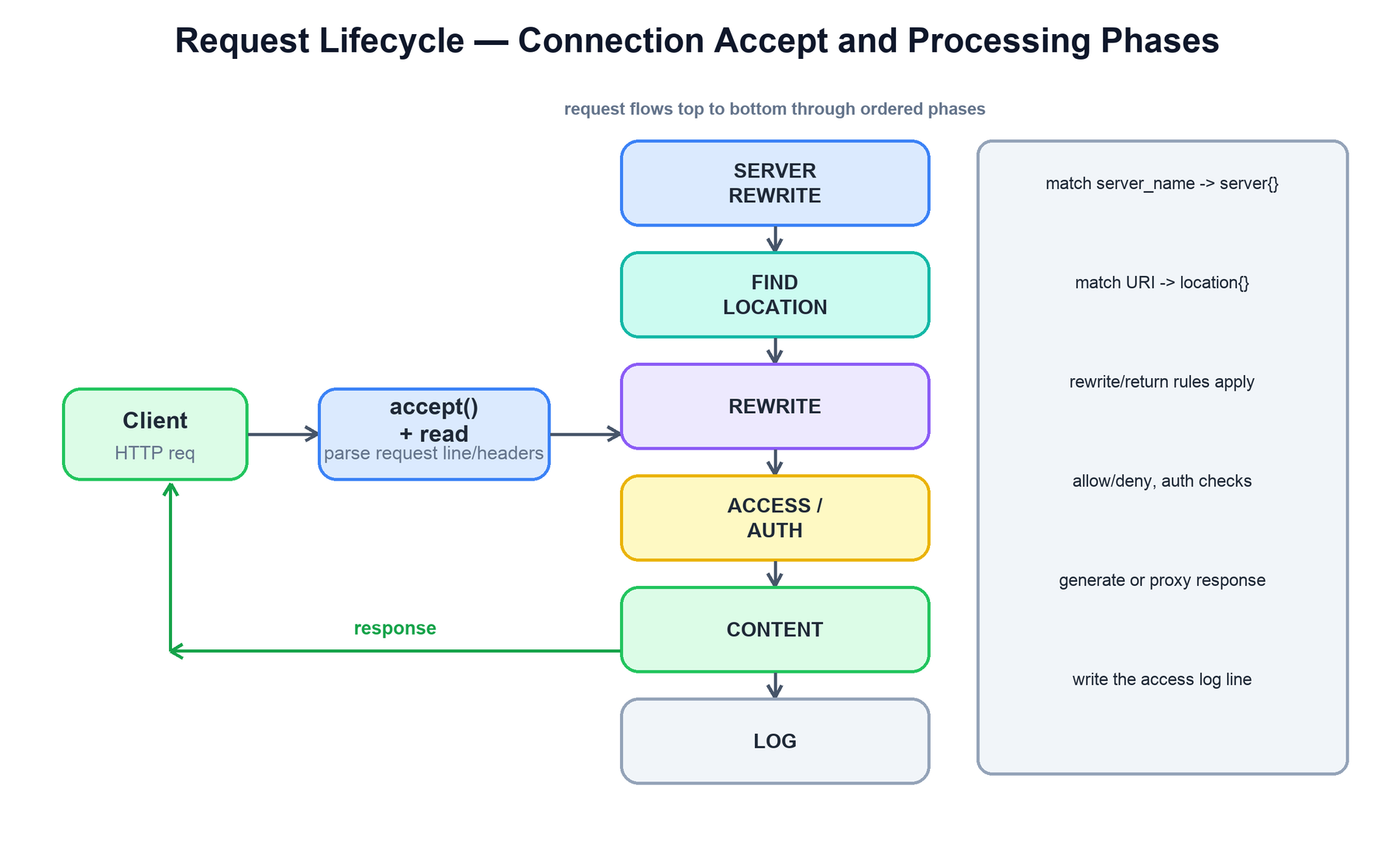
The phases, in order, do roughly the following:
| Phase | What happens |
|---|---|
| Accept & read | Accept the connection, read the request line and headers, parse them into a request structure. |
| Server selection | Match the Host header against server_name to pick the virtual server (server { } block). |
| Find location | Match the request URI against the location blocks to select the configuration that applies. |
| Rewrite | Apply rewrite / return rules; URIs may be modified and re-matched. |
| Access / auth | Enforce allow/deny, authentication (auth_basic, auth_request), and rate limits. |
| Content | Generate the response: serve a static file, run a handler, or proxy to an upstream backend. |
| Log | Write the access log line after the response is sent. |
For static content the content phase reads a file from disk (or the page cache); for dynamic content it proxies the request to a backend, which is the subject of the next section. The response then travels back out through any configured output filters (gzip, headers, chunked encoding) before being written to the client.
handle_request(conn):
  req = parse_request_line_and_headers(conn)
  server   = match_server_name(req.host)          # server { }
  location = match_location(server, req.uri)       # location { }
  apply_rewrites(req, location)                    # may re-loop
  if not access_allowed(req, location):
    return respond(req, 403)
  resp = run_content_phase(req, location)          # file or proxy_pass
  resp = run_output_filters(resp)                  # gzip, headers ...
  send(conn, resp)
  write_access_log(req, resp)
5. Reverse Proxy and Upstreams
NGINX's most common production role is as a reverse proxy sitting in front of application servers. The proxy_pass directive forwards a request to an upstream — a named group of backend servers. NGINX opens (or reuses) a connection to a backend, forwards the request, reads the response, and relays it to the client.
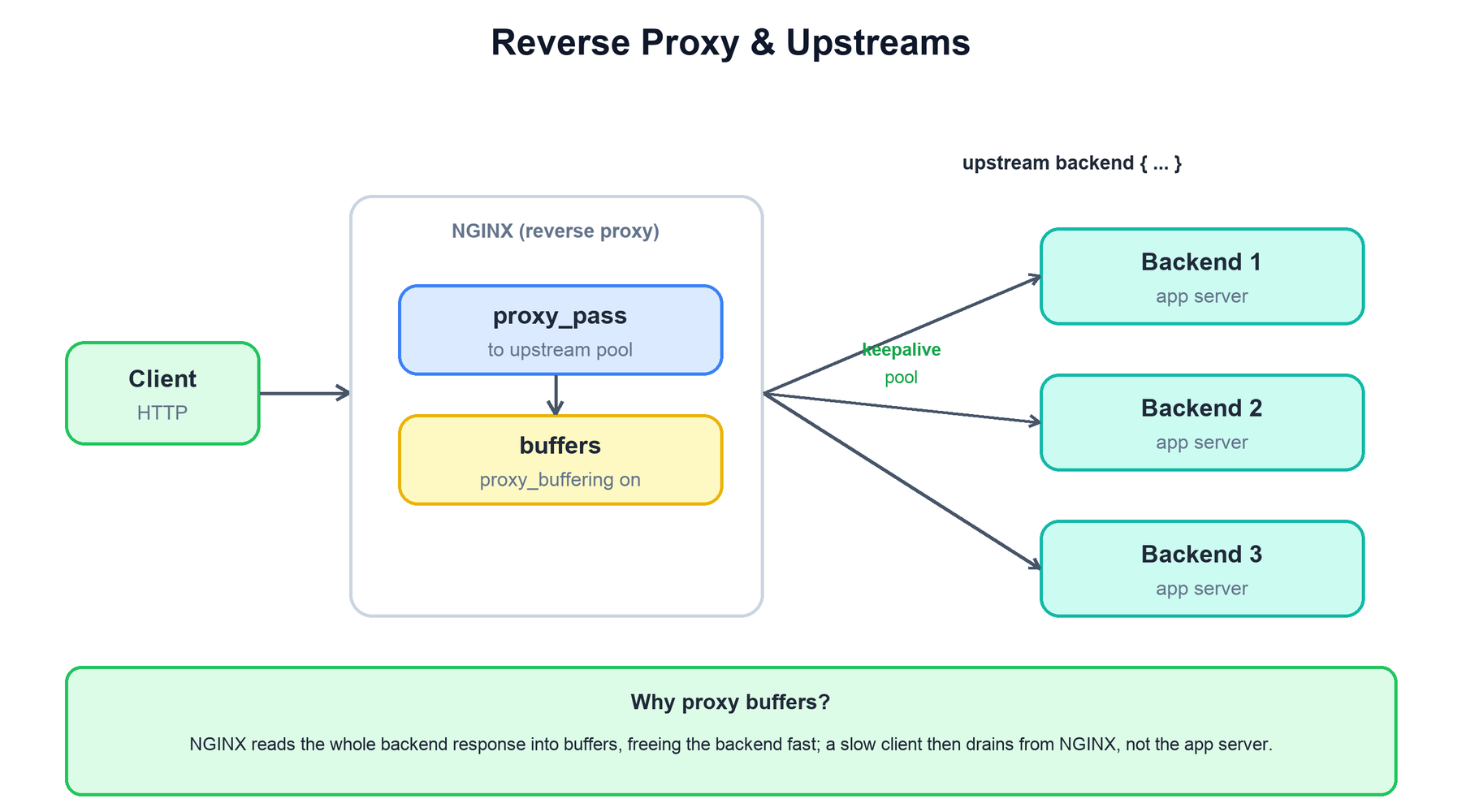
Two mechanisms make this efficient:
- Buffering. With
proxy_buffering on(the default), NGINX reads the backend's entire response into memory buffers (spilling to disk if large) as fast as the backend can send it, then frees the backend connection. A slow client afterward drains the response from NGINX, not from the application server. This decouples fast backends from slow clients and is one of the biggest reasons to put NGINX in front of an app server. - Upstream keepalive. Opening a fresh TCP (and possibly TLS) connection per request to a backend is expensive. A
keepalivedirective in the upstream block keeps a pool of idle connections open and reuses them across requests, cutting latency and backend load.
upstream backend {
  server 10.0.0.1:8080;
  server 10.0.0.2:8080;
  keepalive 32;                 # reuse up to 32 idle conns
}

server {
  location / {
    proxy_pass http://backend;            # forward to the pool
    proxy_buffering on;                    # shield backend from slow clients
    proxy_set_header Host $host;
    proxy_set_header X-Forwarded-For $remote_addr;
  }
}
6. Load Balancing
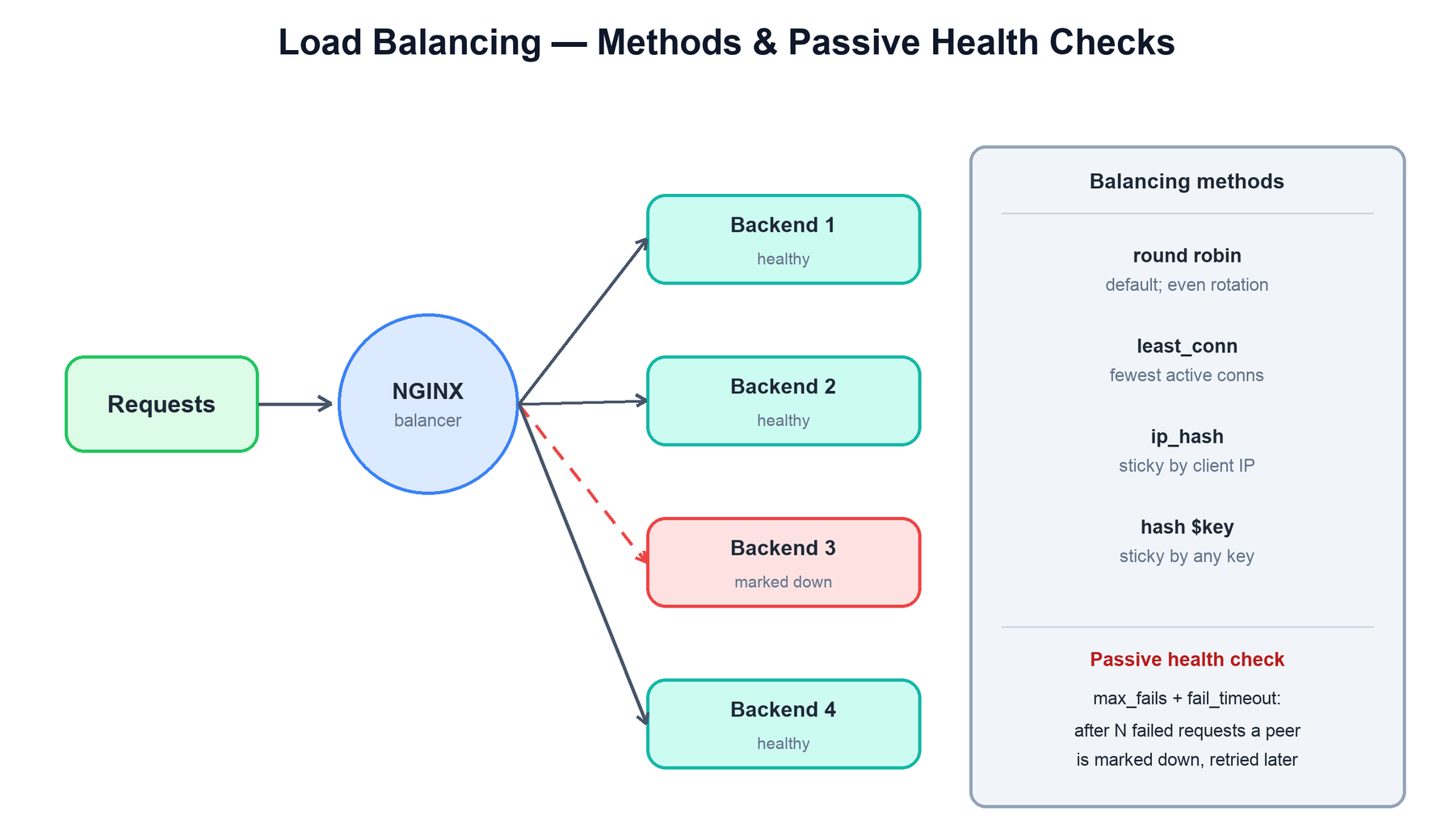
When an upstream block lists several servers, NGINX load-balances requests across them. The balancing method is chosen per upstream, and NGINX also tracks backend health so it can route around failures.
| Method | How it picks a backend | Use when |
|---|---|---|
| Round robin (default) | Cycles through servers in order, optionally weighted. | Backends are interchangeable and stateless. |
| least_conn | Sends each request to the server with the fewest active connections. | Request durations vary, so even rotation would imbalance load. |
| ip_hash | Hashes the client IP to always map a client to the same backend. | You need session stickiness without shared session storage. |
| hash $key | Hashes an arbitrary key (URI, header, cookie) to a backend, optionally consistent. | Stickiness by something other than IP, e.g. cache affinity by URL. |
Passive health checks come built in: with max_fails and fail_timeout, if a backend produces too many failed responses within the window, NGINX marks it down, stops sending it traffic, and retries it only after the timeout. (NGINX Plus adds active health checks that probe a dedicated health endpoint on a schedule rather than waiting for real requests to fail.)
function pick_backend(upstream, req):
  candidates = [s for s in upstream.servers if s.is_up()]
  if upstream.method == "least_conn":
    return min(candidates, key = lambda s: s.active_conns)
  if upstream.method == "ip_hash":
    return candidates[hash(req.client_ip) % len(candidates)]
  return round_robin_next(candidates)        # default, weighted

# passive health: on repeated errors, take the peer out of rotation
on_response_error(server):
  server.fails += 1
  if server.fails >= max_fails:
    server.mark_down(for = fail_timeout)
7. Caching and Shared Memory
NGINX can cache upstream responses on local disk so repeat requests are served without touching the backend at all. A proxy_cache_path declares a directory on disk plus a shared memory zone (keys_zone) that holds the cache index — the set of keys and their metadata — so every worker can check for a hit without scanning the filesystem.
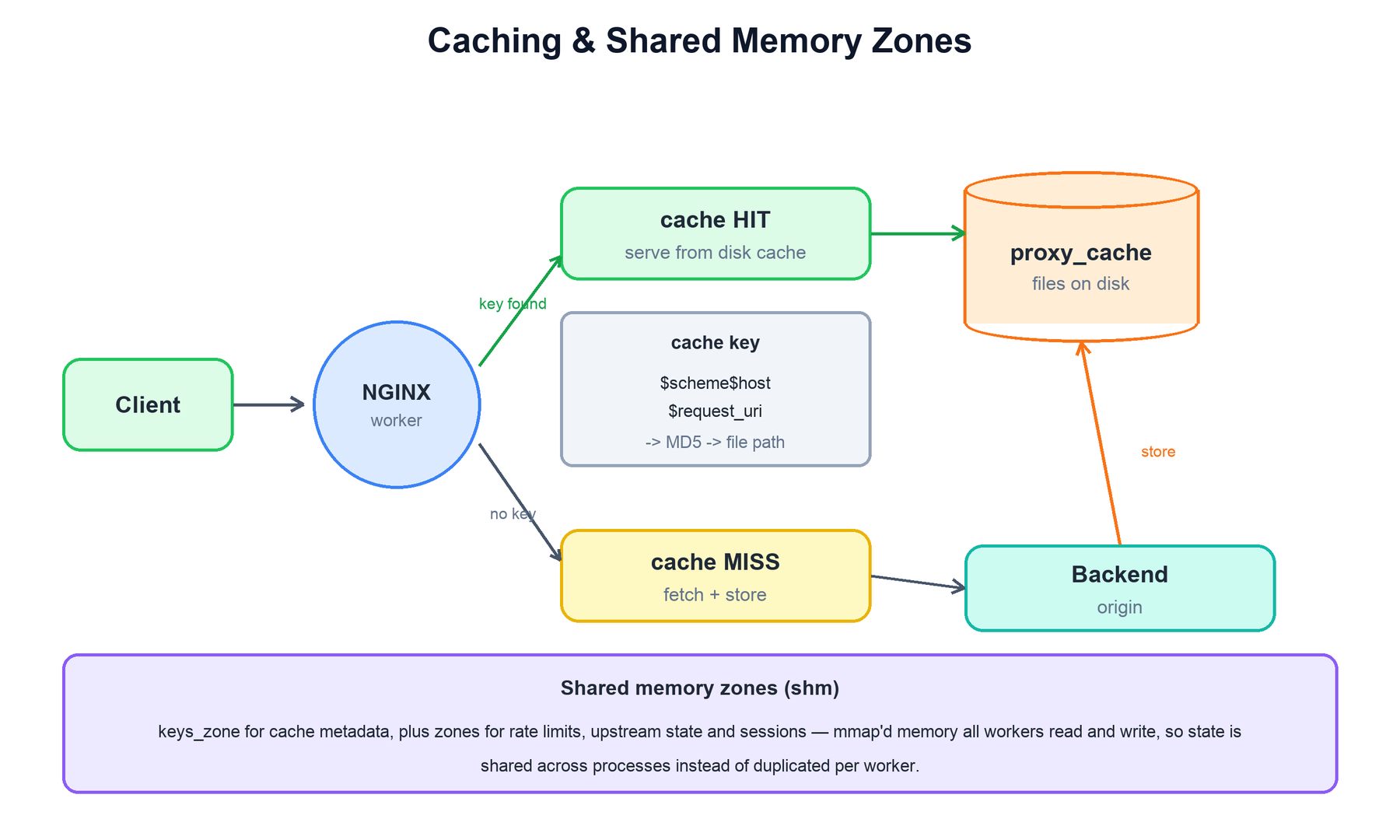
On each request NGINX computes a cache key (by default $scheme$proxy_host$request_uri), hashes it to locate the cached file, and either serves the stored response (a HIT) or fetches it from the backend, stores it, and serves it (a MISS). Cache freshness is governed by proxy_cache_valid and the backend's Cache-Control headers.
The deeper idea here is the shared memory zone. Because workers are separate processes, anything they must agree on cannot live in one worker's private heap. NGINX places such state in mmap-backed shared memory that all workers map and update under a lock. This is used for far more than the cache index:
- Cache metadata — the
keys_zoneindex of what is cached and when it expires. - Rate limiting —
limit_req_zone/limit_conn_zonecounters, so a client's request rate is tracked across all workers, not per worker. - Upstream state — shared health and connection counts so every worker has a consistent view of which backends are up.
- SSL session cache — reusable TLS sessions shared across workers to avoid full handshakes.
proxy_cache_path /var/cache/nginx
    keys_zone=mycache:10m          # 10 MB shared zone for the index
    max_size=10g inactive=60m;     # disk cap + idle eviction

location / {
  proxy_cache mycache;
  proxy_cache_key $scheme$host$request_uri;     # -> hashed to a file path
  proxy_cache_valid 200 10m;                     # cache 200s for 10 min
  proxy_pass http://backend;
}
# the cache index lives in shared memory so every worker sees the same hits
8. Graceful Reload and Binary Upgrade
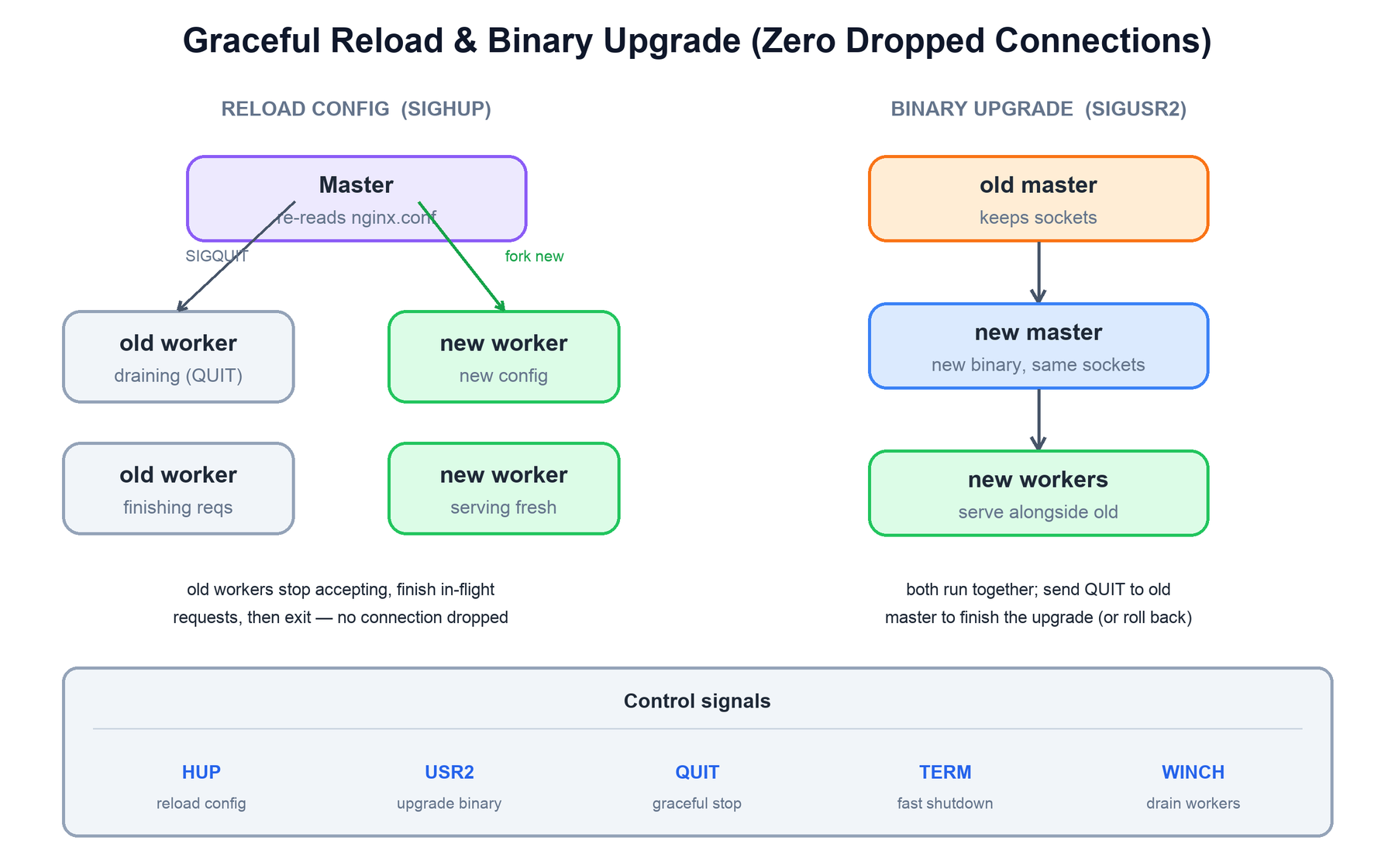
NGINX is controlled at runtime through Unix signals sent to the master process, and its signature operational feature is changing configuration — or even the running binary — without dropping a single connection. This is possible precisely because the master, not the workers, owns the listening sockets.
Graceful reload (SIGHUP)
When the master receives SIGHUP, it re-reads and validates the configuration. If the new config is valid, it starts a fresh set of worker processes using it, then signals the old workers to gracefully shut down (SIGQUIT). Old workers immediately stop accepting new connections but keep serving their in-flight requests to completion; once their last request finishes, they exit. New connections go to the new workers, in-flight requests on old workers complete, and no connection is ever refused or cut off. If the new config is invalid, the master logs the error and keeps the old workers running unchanged.
Binary upgrade (SIGUSR2)
Upgrading the NGINX executable itself works the same way, one level up. On SIGUSR2 the running master forks and execs the new binary as a second master, passing it the inherited listening socket descriptors. Both masters and both sets of workers now run side by side, sharing the same listening sockets and serving traffic together. You verify the new version is healthy, then send the old master SIGQUIT to retire it gracefully — or, if something is wrong, send SIGTERM/SIGQUIT to the new one and roll back to the old, all without interrupting service.
| Signal | Sent to | Effect |
|---|---|---|
HUP | master | Reload config: validate, fork new workers, gracefully retire old ones. |
USR2 | master | Binary upgrade: start a new master/binary sharing the listening sockets. |
QUIT | master or worker | Graceful shutdown: stop accepting, finish in-flight requests, then exit. |
TERM / INT | master | Fast shutdown: terminate workers immediately. |
WINCH | master | Gracefully shut down workers but keep the master (used during upgrades). |
on SIGHUP (graceful reload):
  new_cfg = parse(nginx.conf)
  if not valid(new_cfg):
    log_error(); keep_old_workers(); return       # no disruption
  start_workers(new_cfg)                           # new conns -> new workers
  for w in old_workers:
    signal(w, QUIT)                                # stop accepting
    # w drains in-flight requests, then exits — zero drops

on SIGUSR2 (binary upgrade):
  new_master = fork(); exec(new_binary, inherited_sockets)
  # old + new run together; both share the listening sockets
  if healthy(new_master): signal(old_master, QUIT) # finish upgrade
else: signal(new_master, QUIT) # roll back9. Summary
NGINX is a small set of ideas applied consistently:
| Concern | Mechanism |
|---|---|
| How does it handle so many connections? | A non-blocking event loop (epoll/kqueue) multiplexing thousands of sockets per worker. |
| Why is memory low and predictable? | Per-connection state is a small struct, not a thread stack; memory tracks active work. |
| How does it use all the cores? | One master plus N single-threaded workers, typically one per CPU core, sharing the listening sockets. |
| How is a request processed? | Accept and parse, then ordered phases: server selection, rewrite, access/auth, content, log. |
| How does it proxy efficiently? | Response buffering plus upstream keepalive decouple slow clients from fast backends. |
| How does it balance and stay healthy? | Round robin / least_conn / ip_hash / hash, with passive health checks taking bad peers out of rotation. |
| How does state cross workers? | Shared memory zones: cache index, rate limits, upstream health, TLS sessions. |
| How does it update with no downtime? | Signals (HUP, USR2, QUIT) reload config or swap the binary while the master holds the sockets. |