Designing a Cloud File Storage / Sync Service
A developer's guide to designing a Google Drive or Dropbox style service: how files move between a user's devices, how only the changed parts of a file travel over the wire, where bytes and metadata actually live, and how concurrent edits and offline clients are reconciled without losing work.
A cloud file storage service lets a user keep a folder of files in sync across every device they own, with the cloud as the authoritative copy. The surface looks simple — drop a file in a folder and it appears everywhere — but underneath there are two largely separate problems. One is storing bytes: taking possibly enormous files, breaking them into pieces, deduplicating and compressing them, and parking them durably in a blob store. The other is tracking truth: a metadata layer that records which files exist, who owns them, who they are shared with, what their revision history is, and which blocks make up each version. The interesting design work is in keeping those two layers consistent and in pushing changes out to other devices quickly. This guide walks through the requirements, then the upload path, the block and metadata layers, storage tiering, deduplication, sync and conflict handling, the notification path, and the consistency model that ties it together.
Contents
1. Requirements
Before drawing boxes it helps to pin down what the service actually promises. The functional requirements are modest in number but each one shapes the design.
| Requirement | What it means |
|---|---|
| Upload & download | A user can add a file of any reasonable size and retrieve it later, byte for byte. Large files must survive flaky connections. |
| Sync across devices | A change made on one device propagates to the user's other devices automatically, ideally within seconds while they are online. |
| Revisions / history | Past versions of a file are retained so a user can view or restore an earlier state rather than only ever seeing the latest write. |
| Sharing | A file or folder can be shared with other users at a given permission level (view or edit), and their devices then sync it too. |
| Change notifications | When the cloud copy changes, online devices are told promptly so they can pull the update instead of polling blindly. |
On the non-functional side the headline goals are durability (an uploaded file is never silently lost), availability (the service is reachable even as individual machines fail), and efficiency (we do not re-upload or re-store data we already have). The consistency expectation is what you might call strong-ish: a device that has finished syncing should see a coherent, recent view of its files and metadata. We do not need cross-region linearizability for every read, but we cannot serve a client stale metadata that points at blocks for a version that no longer exists. Most of the consistency work, as we will see, is about keeping the metadata cache honest.
2. High-Level Architecture
A client talks to the service through a load balancer that fans requests out across a fleet of stateless API servers. Those servers own the metadata layer; the heavy lifting of file bytes is delegated to a separate tier of block servers writing to cloud storage. A notification service runs alongside to push changes back out to clients.
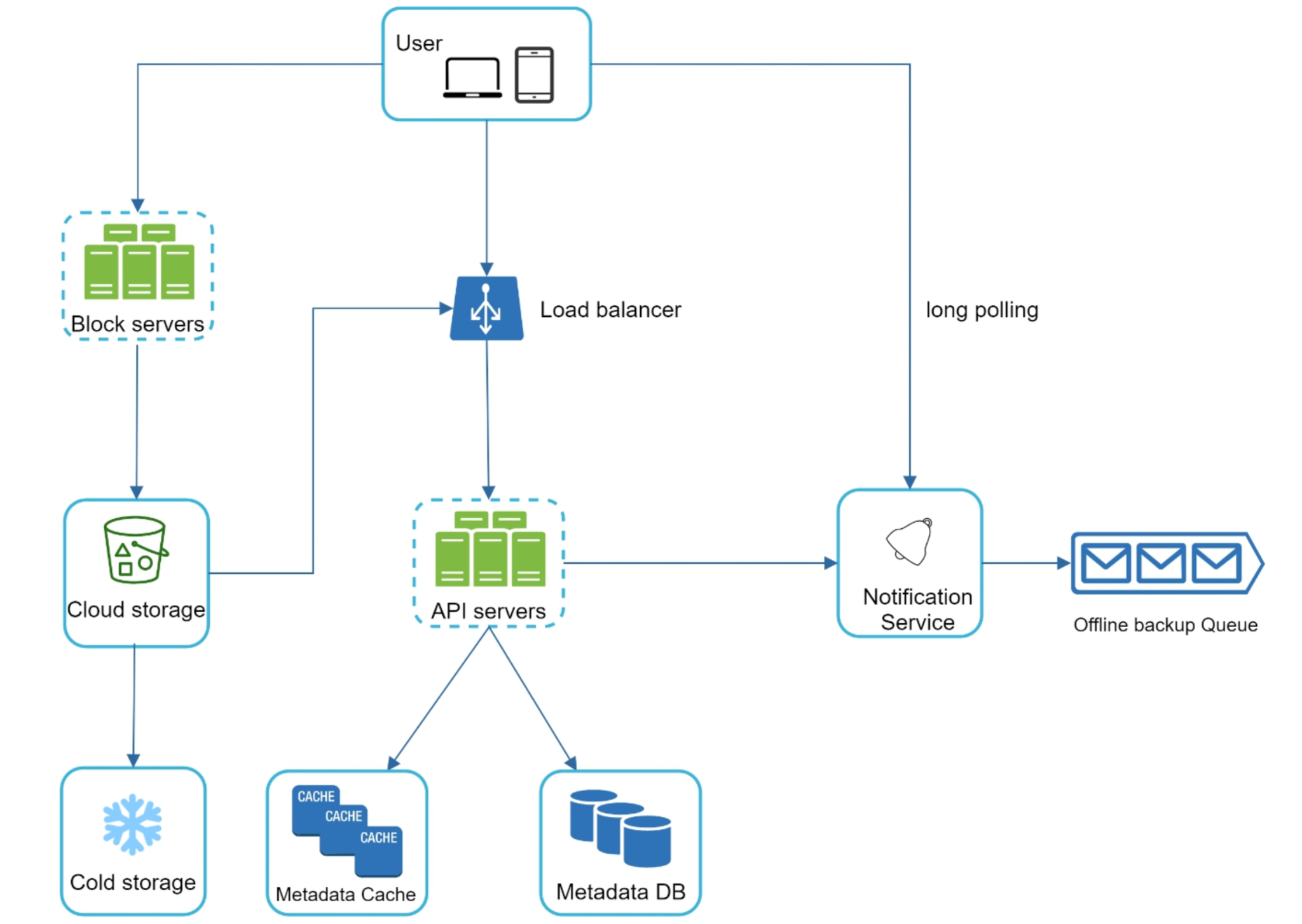
The components and their jobs:
- Load balancer: spreads client connections across the API fleet and removes any single server as a bottleneck or a point of failure.
- API servers: stateless front-end servers that authenticate requests, enforce sharing permissions, and orchestrate the metadata reads and writes. Being stateless, they scale horizontally — any server can handle any request.
- Metadata DB: the source of truth for files, folders, users, versions, sharing, and the file→block mapping. Transactional, because correctness here matters more than raw throughput.
- Metadata cache: an in-memory cache (for example, a key-value store) that absorbs the heavy read traffic on metadata so the database is not hammered for every directory listing.
- Block servers: the tier that turns a file into blocks (and back), compresses and encrypts them, and reads/writes them to the blob store. They carry the bandwidth, not the API servers.
- Cloud storage: the durable blob store that holds the actual file blocks, replicated for durability.
- Cold storage: a cheaper, slower tier that rarely-accessed blocks are migrated to in order to cut cost.
- Notification service: watches for committed changes and pushes them to subscribed devices over long-lived connections.
- Offline backup queue: holds the change events destined for devices that are currently offline, so nothing is missed and the events are delivered on reconnect.
3. Upload Strategies
Not all uploads are the same. A 20 KB note and a 4 GB video have completely different failure profiles, and the protocol should reflect that. The service supports two upload modes.
| Strategy | How it works | Best for / tradeoff |
|---|---|---|
| Simple upload | The whole file is sent in a single request. If it fails, the client retries the entire upload from the start. | Small files. Minimal protocol overhead, but a dropped connection wastes everything already sent — unacceptable for large files. |
| Resumable upload | The client first opens an upload session and receives a session ID. The file is then sent in chunks; each acknowledged chunk advances a committed offset stored against the session. After an interruption the client asks the server for the last committed offset and resumes from there. | Large files and unreliable networks. Slightly more chatty, but a 30-second blip never costs more than the chunk in flight. |
Resumable upload is what makes large-file sync feel robust. Because the session tracks progress on the server side, the client can crash, the laptop can sleep, the network can flap, and the upload still picks up where it left off rather than starting over.
# resumable upload: client side
function upload(file):
  if file.size <= SIMPLE_UPLOAD_LIMIT:
    POST /upload  body=file              # one shot, retry whole on fail
    return

  session = POST /uploads               # open session, get session_id
  offset = 0
  while offset < file.size:
    chunk = file.read(offset, CHUNK_SIZE)
    try:
      PUT /uploads/{session.id}?offset={offset}  body=chunk
      offset += len(chunk)
    except network_error:
      offset = GET /uploads/{session.id}/offset  # resume point
  POST /uploads/{session.id}/complete          # commit the file
4. Block Servers and Delta Sync
This is the central idea of the whole design. Files are not stored as single opaque blobs; each file is split into fixed-size blocks (a few megabytes each). The list of blocks, in order, is the file. Two things fall out of this that make sync efficient.
The first is delta sync. When a user edits a large file, almost always only a small part of it actually changed. Because the file is a sequence of blocks, the client can compute which blocks differ from the version the cloud already has and send only those blocks. A one-line edit to a large document moves one block, not the whole file. This is the difference between a sync that finishes instantly and one that re-uploads gigabytes for a trivial change.
The second is the processing pipeline each block goes through before it lands in storage. On the way down, a block server takes a raw block and:
- Hashes it, producing a content fingerprint used for deduplication and as the block's identity.
- Compresses it, so the bytes stored and transferred are smaller.
- Encrypts it, so what lands in the blob store is unreadable without the key.
- Writes the resulting object to cloud storage, then records the block in the file→block mapping in metadata.
Download is the same steps in reverse: fetch the blocks for the requested version, decrypt, decompress, and reassemble them in order. Splitting files this way is what lets delta sync, deduplication, and tiering all operate at the granularity of a block rather than a whole file.
# client computes the delta, block servers process each block
function sync_changed_file(file, known_blocks):
  local_blocks = split_into_blocks(file)       # fixed-size chunks
  for block in local_blocks:
    h = hash(block)
    if h not in known_blocks:                  # only changed blocks
      payload = encrypt(compress(block))
      block_server.put(h, payload)             # write to blob store
metadata.commit_version(file, [hash(b) for b in local_blocks])5. Metadata and Caching
If the blocks are the bytes, the metadata is the meaning. The metadata DB records everything the byte layer does not understand:
- Files and folders: names, paths, sizes, timestamps, and the tree structure they form.
- Users and ownership: who owns what, and their account-level state.
- Versions: the revision history of each file, each version pointing at the ordered list of blocks that compose it.
- Sharing: which files and folders are shared with which users, at what permission level.
- File→block mapping: the heart of reassembly — for a given version, the ordered block hashes needed to rebuild the file.
Metadata reads vastly outnumber writes. Every directory listing, every sync check, every "has this changed?" poll touches metadata. To keep the database from being the bottleneck, hot metadata is served from a metadata cache sitting in front of it. A read first checks the cache; on a miss it falls back to the database and populates the cache. The catch is that a cache introduces the possibility of staleness, which is exactly the problem the consistency model (section 10) has to solve.
# read-through metadata cache
function get_metadata(key):
  value = cache.get(key)
  if value is not None:
    return value                  # cache hit
  value = metadata_db.get(key)    # miss: fall back to source of truth
  cache.set(key, value)
  return value
6. Storage Tiering
Most files are touched heavily right after they are created and then sit untouched for months or years. Treating every block as equally hot wastes money, because the fast, replicated storage that serves active files costs far more per byte than archival storage. The service therefore tiers blocks by access pattern.
| Tier | Holds | Profile |
|---|---|---|
| Hot cloud storage | Blocks for active, recently-accessed files. | Fast reads, higher cost per byte. The default landing place for new blocks. |
| Cold storage | Blocks not accessed for a long time. | Much cheaper per byte, slower to retrieve. A background job migrates blocks here once they go cold. |
A background process watches access timestamps and moves blocks that have not been read in a long while down to cold storage, updating their location in metadata. If a user later opens an archived file, the block is retrieved from the cold tier — slower, but rare, and the cost savings on the long tail of dormant data are large.
7. Deduplication
Because every block is identified by the hash of its contents, the service can store any given block exactly once no matter how many files or users contain it. This is content-addressed deduplication. Before writing a block, the block server checks whether a block with that hash already exists; if it does, it simply references the existing one instead of storing a second copy.
The savings are substantial. The same attachment mailed to a hundred colleagues, the same shared template copied into many folders, the unchanged blocks of a file across all its revisions — all collapse to a single stored copy. Deduplication operates at the block level, so even two large files that differ slightly share every block they have in common.
# dedup on write: store identical bytes once
function store_block(block):
  h = hash(block)
  if blob_store.exists(h):
    refcount.increment(h)         # already stored — just reference it
    return h
  blob_store.put(h, encrypt(compress(block)))
  refcount.set(h, 1)
return h8. Sync and Conflict Handling
Sync is straightforward when one device edits at a time: the device uploads its changed blocks, commits a new version in metadata, and the notification service tells the other devices to pull it. The hard case is when two devices edit the same file before either has seen the other's change — both started from version v and each produced its own next version.
Detection relies on versioning. Every committed change carries the base version it was derived from. When a device tries to commit a new version whose base is no longer the latest version on the server, the server knows a concurrent change happened — the device was working from a now-superseded copy.
Reconciliation then has to choose a policy. Common approaches, in rough order of how much they try to preserve:
- Last writer wins: the later commit becomes the latest version and the earlier one is retained in history. Simple, but the "losing" edit is no longer the live copy. Acceptable when the file format cannot be merged.
- Conflict copies: rather than discard either edit, the service keeps both — the live file plus a separate "conflicted copy" (often named with the device or user and a timestamp). The user resolves it manually. This is the safest default for opaque files because no edit is ever lost.
- Merge (where possible): for structured or text content the two sets of changed blocks can sometimes be merged automatically. This is the exception, not the rule, since most file types cannot be merged byte-wise.
# server-side conflict detection on commit
function commit_version(file, base_version, new_blocks, device):
  current = metadata.latest_version(file)
  if base_version == current:
    metadata.add_version(file, new_blocks)     # fast path, no conflict
    notifier.publish(file, owners_and_sharers(file))
    return OK
  # concurrent edit: device worked from a stale base
  conflicted = make_conflict_copy(file, device)
  metadata.add_version(conflicted, new_blocks) # keep both edits
  notifier.publish(file, owners_and_sharers(file))
  return CONFLICT(conflicted)
9. Notification Service
Once a change is committed, the other devices need to learn about it without constantly asking. The service uses long polling: a device opens a request to the notification service that the server holds open instead of answering immediately. The connection stays parked until either a change relevant to that device occurs — at which point the server responds and the device pulls the update — or a timeout fires, after which the device simply re-opens the connection. This gives near-real-time delivery for online devices without the cost of a flood of empty polls.
Long polling only works for devices that are currently connected. A device that is offline — laptop closed, phone out of signal — cannot hold an open connection, yet it must not miss the changes that happened while it was away. That is the job of the offline backup queue: change events destined for a disconnected device are durably queued, and when the device reconnects it drains the queue and applies everything it missed before resuming normal long polling.
# notification fan-out on a committed change
function publish(file, recipients):
  for device in devices_of(recipients):
    if device.online:
      long_poll(device).respond(change_event(file))  # push now
    else:
      offline_queue(device).enqueue(change_event(file)) # deliver later

function on_reconnect(device):
  for event in offline_queue(device).drain():
    device.deliver(event)                # catch up on missed changes
  open_long_poll(device)                  # resume real-time path
10. Consistency Model
The trickiest correctness question in the whole design is keeping the metadata cache and the metadata DB (the source of truth) in agreement. The cache exists to absorb read load, but every cache is a chance to serve a stale answer — and stale metadata is especially dangerous here, because metadata points at blocks. A cached file→block mapping for an old version could direct a client to fetch blocks that have since been superseded or, worse, garbage-collected.
The rule that keeps reads honest is simple: on every write, fix the cache before the next read can see the old value. There are two ways to do this, and most systems use a mix:
| Approach | On write | Tradeoff |
|---|---|---|
| Invalidate | Delete the affected entry from the cache. The next read misses, falls through to the database, and repopulates with fresh data. | Simple and safe. Costs one extra database read after each write. |
| Update (write-through) | Write the new value into the cache at the same time as the database, so the cache stays warm. | No post-write miss, but more care needed to keep the two writes ordered and consistent. |
Either way the invariant is that a read never returns metadata for a version older than the latest committed one. Combined with the commit path checking the base version (section 8), this gives the "strong-ish" guarantee from the requirements: a synced device sees a coherent, current view, and the blocks it is told to fetch always exist.
# keep cache and source of truth in agreement on write
function commit_and_refresh(key, new_value):
  metadata_db.write(key, new_value)     # source of truth first
  cache.invalidate(key)                 # or: cache.set(key, new_value)
# next read repopulates from the DB — never serves the stale value11. Summary
The design comes down to a handful of decisions that reinforce each other:
| Concern | Mechanism |
|---|---|
| How are large files uploaded reliably? | Resumable uploads with an upload session and committed-offset tracking; simple one-shot upload for small files. |
| How is sync made cheap? | Files are split into fixed-size blocks; only changed blocks are sent (delta sync), and they are compressed and encrypted before storage. |
| Where does truth live? | A transactional metadata DB for files, users, versions, sharing, and the file→block mapping, fronted by a metadata cache for reads. |
| How is storage kept affordable? | Hot cloud storage for active blocks, with a background job tiering cold blocks down to cheap cold storage. |
| How is duplicate data avoided? | Content-addressed dedup: each block is identified by its hash and stored exactly once, reference-counted for safe deletion. |
| How are concurrent edits handled? | Commits carry their base version; a stale base signals a conflict, resolved by last-writer-wins, conflict copies, or merge. |
| How do devices learn about changes? | Long polling pushes changes to online devices; an offline backup queue holds events for disconnected devices until reconnect. |
| How is stale metadata avoided? | Write the source of truth first, then invalidate or update the cache, so reads never serve metadata for a superseded version. |