Designing a Chat System
A system design interview walkthrough for building a real-time chat service like WhatsApp or Messenger: the connection protocol that carries messages, the split between stateless and stateful services, how chat history is stored and ordered, and how messages reach a recipient whether they are online or away.
A chat system looks deceptively simple from the outside — type a message, it shows up on someone else's screen — but it pushes on a specific set of design problems. The server has to push data to a client at an arbitrary moment, not just respond when asked. Messages must be durable so history survives a restart, ordered so a conversation reads correctly, and delivered fast when both parties are connected. And the same conversation may need to reach a recipient who is offline, on three devices, or part of a 500-person group. This guide builds the system up one decision at a time, in the order an interview tends to follow.
Contents
1. Requirements
Before drawing boxes, pin down what the system must actually do. A focused feature list keeps the design honest and gives the interview a clear scope.
| Requirement | What it means |
|---|---|
| 1:1 chat | Two users exchange text messages in near real time, with low end-to-end latency when both are connected. |
| Group chat | A message sent to a group is delivered to every member. Group sizes are bounded (say, up to a few hundred) to keep fanout tractable. |
| Online presence | Users can see whether their contacts are online, away, or last seen at some time. |
| Push when offline | If a recipient is not connected, the message is still delivered later, and a push notification alerts them on their device. |
| Message history | Messages are persisted durably and can be re-read across sessions and devices, ordered by time. |
The non-functional shape matters just as much. Chat is write-heavy (every message is a write, and group messages multiply that), latency-sensitive on the delivery path, and must keep a persistent connection open per active client. History grows without bound, so storage has to scale horizontally and read access is dominated by recency — people scroll the most recent messages far more often than ancient ones.
2. Connection Protocols
The defining challenge of chat is the server-to-client direction. A client can always open a request to send a message, but how does the server deliver a message that arrives for a client at an unpredictable time? Plain request/response does not push. Three techniques bridge that gap, and they sit on a spectrum from wasteful to efficient.
| Technique | How it works | Tradeoff |
|---|---|---|
| Polling | The client asks the server "anything new?" on a fixed interval and the server answers immediately, empty or not. | Simple, but most polls return nothing — wasted requests. Poll too often and you burn resources; poll too rarely and messages are delayed. |
| Long polling | The client asks, and the server holds the request open until it has something to send or a timeout expires, then the client immediately re-asks. | Far fewer empty responses, but each message needs a fresh HTTP request, connections are held server-side, and there is still no clean server-initiated path — the server cannot push to a client that is between requests. |
| WebSocket | A single long-lived, full-duplex TCP connection, upgraded from HTTP once at the start. Either side can send a frame at any time. | One persistent connection per client to manage, but messages flow in both directions with minimal overhead and true server push. |
WebSocket is the preferred choice for the message path. After a one-time HTTP Upgrade handshake, the connection stays open and becomes bidirectional: the client sends outgoing messages over it, and the server pushes incoming messages down the same socket the instant they appear. There is no polling delay and no repeated handshake cost. The price is that the connection is stateful — the server must keep it alive and remember which user is on the other end — which shapes the rest of the architecture.
# client opens one persistent socket and reuses it both ways
ws = websocket_connect("wss://chat.example.com")    # HTTP Upgrade once
ws.on_message(msg -> render(msg))                   # server pushes inbound
ws.send(outbound_message)                           # client sends outbound
# the same socket carries both directions until it closes3. Service Decomposition
The WebSocket requirement forces a clean split in the backend. Most of the system is ordinary request/response work that any web tier handles well. Only the live connection is special. Separating the two lets each scale on its own terms.
| Tier | Examples | State |
|---|---|---|
| Stateless services | Authentication, user profile, contacts, group management, the general API. | Hold no per-connection state. Any instance can serve any request, so they sit behind a load balancer and scale by adding identical replicas. |
| Stateful chat service | The WebSocket servers that terminate live client connections. | Each one holds a set of open sockets and knows which user owns each. A client is bound to one specific server for the life of its connection. |
The stateless tier is the easy part: a load balancer spreads requests across interchangeable instances, and login, profile lookups, and group edits all flow through it. The chat service is the hard part precisely because it is sticky. Once a client establishes its WebSocket to a particular chat server, every message for that user must be delivered through that server, because that is where the socket physically lives. You cannot round-robin an inbound message to a random instance and hope it lands on the one holding the connection.
This stickiness is why we need two more pieces that a stateless system would not: a way to find which chat server holds a given user's connection (service discovery, section 5), and a way to route a message from the sender's chat server to the recipient's chat server (the message sync queue, section 6).
4. Storage and Message IDs
Chat history has an unusual access shape, and it points firmly at a key-value / NoSQL store rather than a relational database.
- Enormous volume. Every message from every user, kept indefinitely. The dataset only grows, so it must shard horizontally across many nodes.
- Write-heavy. Each message is a write, and group messages amplify that. The store must absorb a high, steady write rate without contention.
- Accessed by recency. Reads are dominated by "give me the latest messages in this conversation" and scrolling backward from there — a range scan over recent keys, not arbitrary joins or analytics.
- Keyed by message id. A message is fetched and ordered by its id; there are no complex relational queries that would justify a SQL engine's overhead.
A NoSQL store fits all four: it scales out, handles heavy writes, and serves recency-ordered range reads cheaply. The remaining question is the message id, and it carries two hard requirements at once. The id must be globally unique (no two messages collide) and sortable by time (sorting by id sorts the conversation chronologically), so that ordering a thread is just "read keys in order" with no extra timestamp field to coordinate.
An auto-increment column from a single database would give ordering but does not scale across shards. A random UUID scales but loses time ordering. The standard answer is a Snowflake-style 64-bit id: a single integer packed from a timestamp in the high bits, a machine/shard id in the middle, and a per-millisecond sequence number in the low bits.
# 64-bit id: time-ordered AND unique without coordination
id = (timestamp_ms  << 22)   # high bits: sorts by time
   | (machine_id    << 12)   # which generator node
   |  sequence_number        # disambiguates within the same ms
# sorting ids ascending == sorting messages chronologically
Because the timestamp occupies the most significant bits, simply sorting ids ascending yields chronological order, while the machine id and sequence number guarantee uniqueness even when many servers generate ids in the same millisecond. That is exactly the property the conversation read path wants.
5. Service Discovery
With connections pinned to specific chat servers, the system needs a directory: which chat server currently holds a given user's WebSocket? This is the job of a service discovery / coordination component, commonly ZooKeeper (or an equivalent).
Service discovery has two responsibilities. First, when a client connects, it picks the best chat server for that client — typically the geographically closest one with capacity — and records the client → chat-server mapping. Second, it exposes that mapping so any part of the system can look up where a user is connected and route a message to the correct server. When a client disconnects or fails over, the mapping is updated so stale routes do not linger.
# on connect: choose a server and register the mapping
server = discovery.pick_chat_server(user, region)   # closest with capacity
discovery.register(user_id, server)                 # user -> server

# on delivery: find where the recipient is connected
target = discovery.lookup(recipient_id)             # which chat server?
if target is None:
route_to_offline_path(recipient_id) # they are not online6. The 1:1 Message Flow
Now the pieces connect. The diagram below traces a single message from User A to User B, numbered step by step. Each number corresponds to one of the components introduced above.
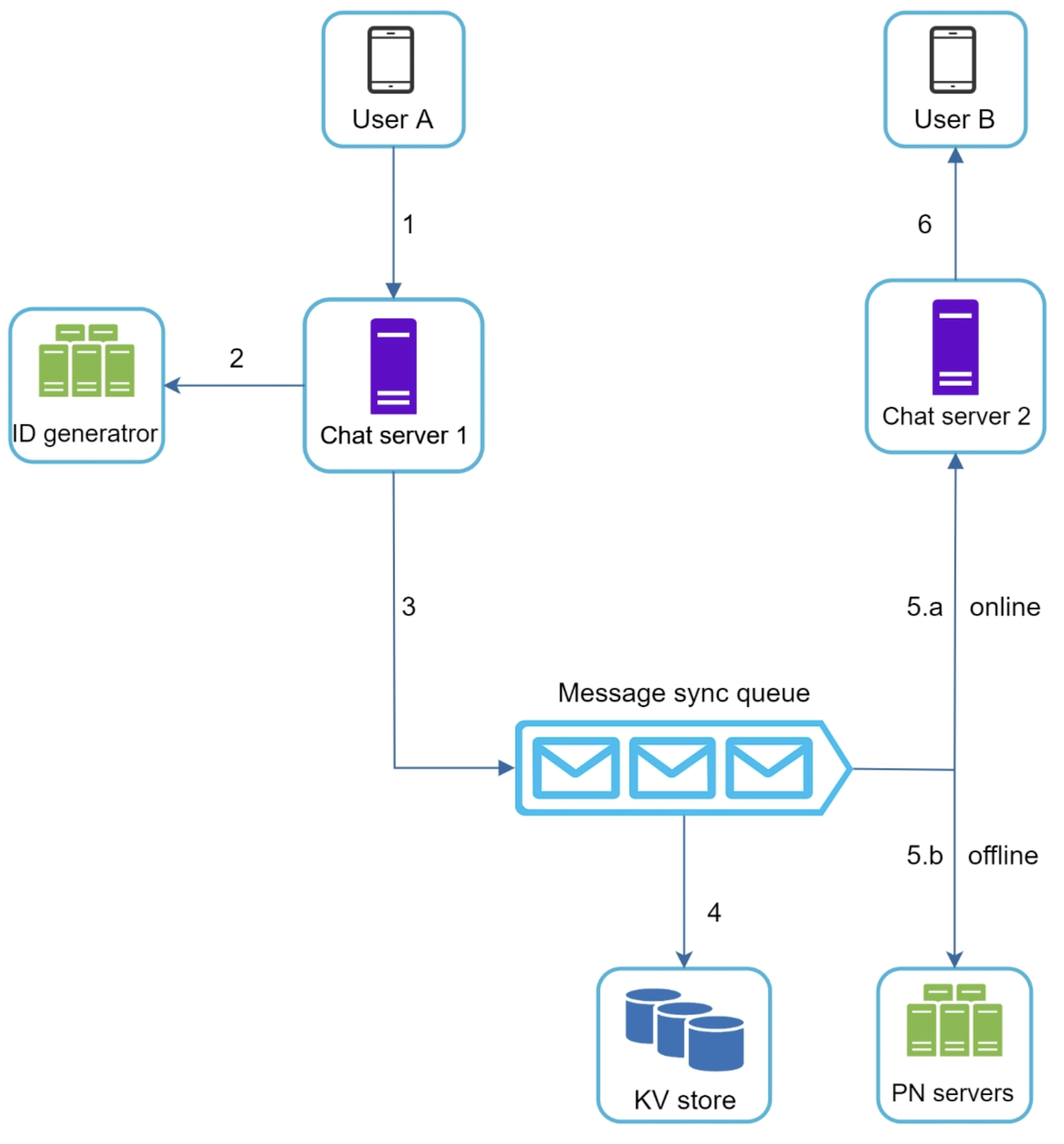
Walking the numbered path:
- (1) User A → Chat server 1. User A sends the message over their open WebSocket to the chat server that holds their connection.
- (2) Chat server 1 → ID generator. The chat server requests a unique, time-sortable message id from the Snowflake-style ID generator. This stamps the message with its place in the global order.
- (3) Chat server 1 → message sync queue. The message, now with an id, is handed to the message sync queue. This queue decouples receiving a message from delivering and persisting it, absorbing bursts and acting as the routing backbone between chat servers.
- (4) → KV store. The message is written to the key-value store, keyed by its id, so it becomes durable history immediately — independent of whether the recipient is currently reachable.
- (5.a) Online path → Chat server 2 → (6) User B. If User B is online, service discovery says which chat server holds their connection (Chat server 2). The message is routed there and pushed down B's WebSocket in real time.
- (5.b) Offline path → PN servers. If User B is not connected, there is no socket to push to. The message goes to the push notification (PN) servers, which alert B's device. The message is already safely in the KV store, so B receives it the next time they come online and sync.
The key insight is that persistence (step 4) happens regardless of presence. Delivery is best-effort and immediate when possible, but durability is guaranteed first. Whether the recipient is online only changes how they are reached — a live socket versus a push notification plus a later sync — never whether the message is kept.
7. Online Presence
Presence — showing whether a contact is online, away, or last seen at a time — rides on the same persistent connection. The chat server uses a heartbeat to know the connection is alive: the client periodically sends a small keep-alive frame, and the server resets a timer each time one arrives.
If heartbeats keep coming, the user is online. If they stop for longer than a threshold (the socket dropped, the app was backgrounded, the network died), the server marks the user offline and records a last seen timestamp. Using a threshold rather than reacting to the first missed beat avoids flapping a user's status on a brief network blip.
# server tracks liveness per connection
on heartbeat(user):
    last_seen[user] = now()
    status[user] = ONLINE

every few seconds:                          # sweep
    for user where now() - last_seen[user] > THRESHOLD:
        status[user] = OFFLINE
        fanout_presence(user, OFFLINE, last_seen[user])
When a status changes, it is fanned out to that user's contacts — but only to contacts who are themselves online and would actually display it, via a presence/fanout path much like the message path. Pushing presence to everyone all the time would be wasteful, so the fanout is scoped to interested, connected viewers. For very large contact lists, presence is often fetched on demand (when you open a conversation) rather than pushed eagerly.
8. Group Chat
Group chat reuses the 1:1 machinery but changes the delivery shape from one recipient to many. The defining operation is fanout: a single message sent to the group must reach every member.
The clean model is that each user has their own message sync queue (think of it as their inbox). When a message is sent to a group, the system looks up the member list and writes one copy of the message into each member's queue. From there, delivery to each member is identical to the 1:1 case: online members get it pushed over their socket, offline members get a push notification and pick it up on sync.
| Aspect | 1:1 chat | Group chat |
|---|---|---|
| Recipients per message | One | Every group member |
| Delivery operation | Route to the single recipient | Fan out: enqueue into each member's queue |
| Cost of a send | Constant | Proportional to group size |
| Ordering | By message id within the pair | By message id within the group, consistent for all members |
# group send = look up members, fan the message into each inbox
id = id_generator.next()
kv_store.put(id, message)                   # persist once
for member in group.members(group_id):
    member_queue(member).enqueue(id)        # one inbox entry each
    deliver_or_notify(member, id)           # socket if online, else PN
This per-member fanout is simple and keeps each recipient's read path identical to 1:1, which is why it works well for bounded group sizes. Because the message id is globally time-sortable, every member sees the group's messages in the same consistent order even though copies were enqueued independently. If groups could be enormous (broadcast-scale), fanout-on-write would become too expensive and a different model would be needed — but for ordinary group sizes, fanning out into per-user queues is the standard approach.
9. Multi-Device Sync
A user is rarely on just one device — phone, laptop, tablet — and all of them should show the same conversation. The per-user message sync queue is what makes this work, and it generalizes naturally to multiple devices.
Each of a user's devices tracks the id of the latest message it has already seen. When a device connects, it tells the server its last-seen id, and the server delivers everything newer from the user's sync queue. Because the message id is monotonic and time-sortable, "everything newer" is just a range read of ids greater than the device's cursor — no per-device duplication of history, just a different read position into the same ordered stream.
# each device resumes from its own cursor
on device_connect(user, device, last_seen_id):
    pending = message_queue(user).read_after(last_seen_id)
    for msg in pending:
        push(device, msg)                   # catch this device up
    # new messages go to every active device of the user
New incoming messages are pushed to all of the user's currently connected devices, and each device advances its own cursor as it acknowledges them. A device that was offline simply replays from where it left off when it reconnects. The same queue-plus-cursor design that delivers offline messages therefore also keeps multiple devices in sync — they are the same problem viewed from different cursors.
10. Summary
A chat system is a handful of decisions that build on each other, each one made to solve the previous one's consequence:
| Concern | Mechanism |
|---|---|
| How does the server push to a client? | A persistent, bidirectional WebSocket connection per active client, chosen over polling and long polling. |
| How do services scale? | Stateless services (auth, profile, API) behind a load balancer; a separate stateful chat service holds the live sockets. |
| Where is history stored? | A key-value / NoSQL store: enormous, write-heavy, read by recency, keyed by message id. |
| How are messages ordered uniquely? | A 64-bit Snowflake-style id — timestamp in the high bits makes ids unique and sortable by time. |
| How is a user's chat server found? | Service discovery (ZooKeeper) maintains the client → chat-server mapping. |
| How does a 1:1 message travel? | Chat server → id generator → message sync queue → KV store → recipient's chat server (online) or push servers (offline). |
| How is presence tracked? | Heartbeats detect online/offline; status changes fan out to connected contacts. |
| How does group chat differ? | Fanout: one copy enqueued into each member's per-user queue, then delivered like 1:1. |
| How do multiple devices stay in sync? | Per-user message sync queue with a per-device last-seen cursor; each device replays what it missed. |